How to Get a Professional Headshot Without a Photographer (2026 Guide)
Stature AI
AI Photography Experts
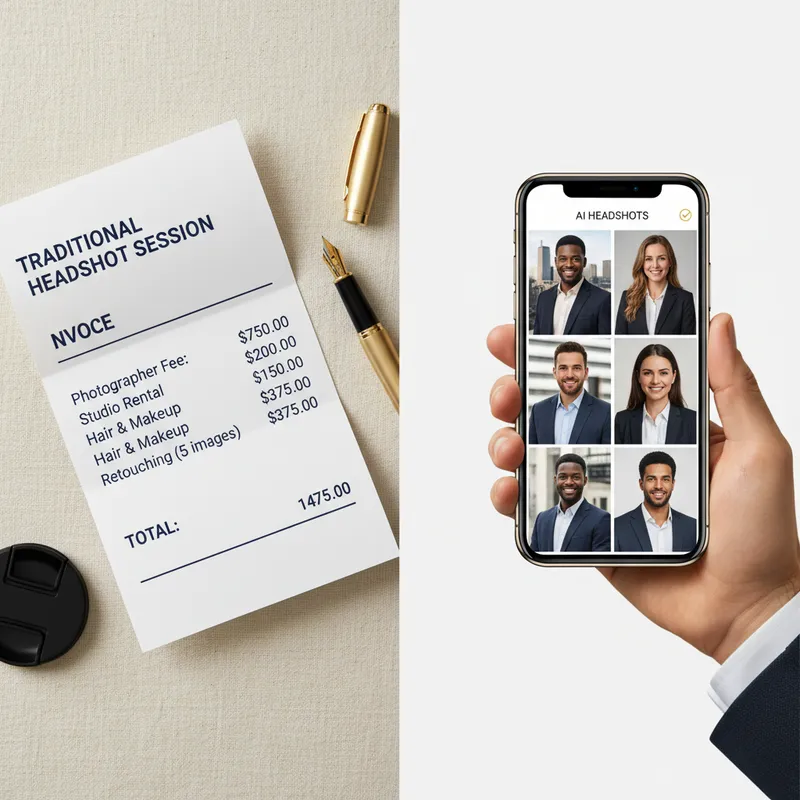
Professional headshots used to be a luxury reserved for corporate executives, actors, and job seekers with budget to spare. A typical session meant scheduling weeks in advance, travelling to a studio, spending $200–$500, and waiting days for retouched proofs.
In 2026, that equation has fundamentally changed.
With improvements in smartphone camera hardware and purpose-built AI portrait tools, you can now produce studio-quality headshots from home in under 10 minutes — for a fraction of the cost of a single studio session.
This guide walks you through the step-by-step process of capturing a great source photo, choosing the right tool, avoiding common AI artifacts, and using your new headshot across LinkedIn, company websites, and professional bios.
Why Traditional Headshots Are Becoming Optional
For decades, professional photography had a monopoly on image quality. Studio lighting setups, full-frame cameras, and post-production retouching created a visual gap that smartphone photos simply couldn't bridge.
Three technological shifts changed that:
-
Smartphone sensor sizes & computational portrait modes have gotten good enough to capture clean facial detail without distortion.
-
AI image-to-image synthesis models can re-render lighting, clothing, backgrounds, and hair while accurately preserving your facial structure and identity.
-
Turnaround times dropped from days to minutes.
Today, recruiters, hiring managers, and prospective clients care about whether your headshot looks professional, trustworthy, and current — not whether you paid a photographer $300 to take it.
Method 1: The DIY Smartphone + AI Route (Recommended)
This is the fastest, highest-quality method for 95% of professionals. You take 5–10 casual selfies or photos taken by a friend, upload them to a specialized AI headshot tool, and receive a set of studio-quality professional portraits.
Step 1: Capture Good Source Photos
The AI's output is directly tied to the input quality. You don't need a professional camera, but you do need to follow a few simple rules:
-
Use natural light: Stand facing a large window during the day. Avoid direct harsh sunlight (creates squinting and dark eye shadows) and avoid overhead ceiling lights (creates yellow color casts).
-
Keep the background simple: Stand in front of a plain wall, door, or uncluttered room. The AI will replace the background, but clean contrast around your hair makes the segmentation sharper.
-
Maintain a natural expression: Take a mix of photos — slight smile, soft smile, neutral professional look. Avoid extreme facial expressions, wide eyes, or duck-face poses.
-
Vary your angle slightly: Take shots straight-on, turned 15° to the left, and turned 15° to the right.
-
No filters or heavy makeup changes: The AI needs to learn your true facial structure.
-
Take 5–10 photos: Having variety helps the model learn your features accurately.
Step 2: Choose a Dedicated AI Headshot Tool
Generic AI image generators (like Midjourney or DALL-E) are not designed for identity-preserving headshots — they will create a fictional person who vaguely resembles you. You need a dedicated tool trained on professional portraiture.
Stature AI is purpose-built for this. It takes your source photos, preserves your facial likeness, and generates high-resolution headshots in six distinct professional styles (Corporate, Tech, Creative, Lifestyle, Cinematic, and Dating).
Key features to look for in an AI tool:
-
Identity preservation: Skin texture, eye color, and facial proportion matching.
-
Style variety: Options for corporate blazers, business casual, or creative studio looks.
-
Speed: Batch processing in minutes, not hours.
-
Free preview: Ability to see sample outputs before committing.
Step 3: Select and Refine Your Favorite Outputs
Once the batch finishes, review the results against professional standards:
-
Eyes: Are both pupils sharp, aligned, and naturally reflective?
-
Hairline: Is the boundary between hair and background clean without blur?
-
Clothing: Does the jacket/collar sit naturally on the shoulders?
-
Lighting: Is the lighting direction consistent across the face and background?
Select 2–3 options: one formal corporate look for LinkedIn/resumes, and one business-casual look for team pages or casual bios.
Method 2: Pure DIY Smartphone Photography (No AI)
If you prefer not to use AI generation tools, you can still take a solid headshot using just your phone and a few basic photography principles.
Equipment Needed
-
Smartphone with a decent portrait mode (iPhone 12+, Samsung S21+, Pixel 6+)
-
A tripod with a phone mount or a friend to hold the phone
-
A window with indirect daylight
Step-by-Step Execution
-
Set up 5–7 feet away: Do not take a close-up selfie with an arm extended. Wide-angle front cameras distort facial proportions (making nose/chin look larger). Use the main back camera, step back 5–6 feet, and use 2× optical zoom or have a friend frame you from chest-up.
-
Eye-level height: Position the camera lens exactly at eye level. Looking down at the camera creates a double-chin effect; looking up looks unnatural.
-
Pose with intention: Turn your body 30 degrees away from the camera, then turn your head back toward the lens. This slims the shoulders and creates depth.
-
Edit conservatively: Use your phone's built-in editor to slightly boost contrast, warm up white balance if needed, and crop to a 1:1 or 4:5 ratio. Avoid heavy smoothing filters.
What to Avoid: 5 Mistakes That Ruin DIY Headshots
-
The Extended-Arm Selfie: Visible arm muscles or distorted facial proportions immediately reveal a selfie.
-
Cropping Out Other People: A cropped photo from a wedding or party always leaves weird shoulders, stray fingers, or mismatched lighting.
-
Harsh Flash Photography: Direct phone flash creates shiny skin, red-eye, and flat, unflattering dimensions.
-
Outdated Photos: Using a photo from 8 years ago creates awkward friction when you meet recruiters or clients on Zoom.
-
Distracting Backgrounds: Cars, messy offices, or bright neon signs pull attention away from your face.
Checklist for a Recruiter-Ready Headshot
-
Face is clearly visible and fills 60–70% of the crop frame
-
Lighting is soft, even, and natural
-
Background is clean and recedes visually
-
Outfit matches your target industry (corporate vs. tech vs. creative)
-
Resolution is sharp at 400×400px (LinkedIn minimum) or higher
-
Image file is saved as JPG/WebP under 5MB
Ready to Get Your New Headshot?
If you want to skip the trial-and-error of manual photography, you can generate professional, recruiter-ready headshots in 2 minutes using Stature AI.
Upgrade Your Professional Image
Stop using outdated or amateur photos for your career. Get studio-quality AI headshots in ~2 minutes with Stature AI. Join thousands of professionals who have already upgraded their digital presence.
Create Your Headshots NowRead Next
AI Headshot Generators for LinkedIn: Top Choices in 2025
Only 9% of LinkedIn users update their profile picture regularly, yet profiles with professional-looking headshots get 21x more profile views and 9x more connection requests. That discrepancy points to a significant missed opportunity for most professionals. Are AI headshot generators finally good enough to bridge the gap?
AI Headshots for Global & Remote Teams: How Distributed Companies Get Consistent Professional Photos
Distributed teams don't need to fly in a photographer for consistent employee photos. See how AI headshots let every remote team member get a matching, professional look from their own laptop.
Best AI Headshot Generators in 2026: An Honest Comparison
We compared 6 top AI headshot generators on quality, speed, privacy, and price. See which tool wins for LinkedIn, job seekers, and professionals in our honest 2026 comparison — and try the #1 pick free.